> For the complete documentation index, see [llms.txt](https://helpcenter.xopero.com/xopero-one-en/llms.txt). Markdown versions of documentation pages are available by appending `.md` to page URLs; this page is available as [Markdown](https://helpcenter.xopero.com/xopero-one-en/backup-and-recovery/jira/integration/custom-domains.md).
# Custom domains
Technical requirements for securing Jira organizations with custom domains.
**Custom domains in Jira allow organizations to use a branded URL instead of the default \*.atlassian.net address. Even if a Jira instance has a custom domain configured, proper protection requires adding the organization to Xopero ONE using the original Atlassian URL.**
***
## General information
**Jira** instances that use custom domains can be integrated with **Xopero ONE**, but must use their original **Atlassian** URL instead of the custom domain. This limitation results from how **Atlassian** identifies and authorizes organizations.
**Atlassian** security and administration APIs are bound to the organization's original **Atlassian**-managed URL (e.g., yourcompany.atlassian.net), not the custom domain. The custom domain serves as a user-facing alias for access and branding purposes.
Internally, **Atlassian** recognizes, authenticates, and grants permissions only through the original URL registered in **Atlassian Administration** ([https://admin.atlassian.com](https://admin.atlassian.com/)). Therefore, **Xopero ONE** must use the original **Atlassian** URL to identify the organization and its applications, authenticate API requests, and enforce security and access controls.
Using the custom domain would prevent proper authorization and could lead to failed connections or incomplete protection, which is why the original **Atlassian** URL is required even when a custom domain is configured.
***
## Finding the original instance URL
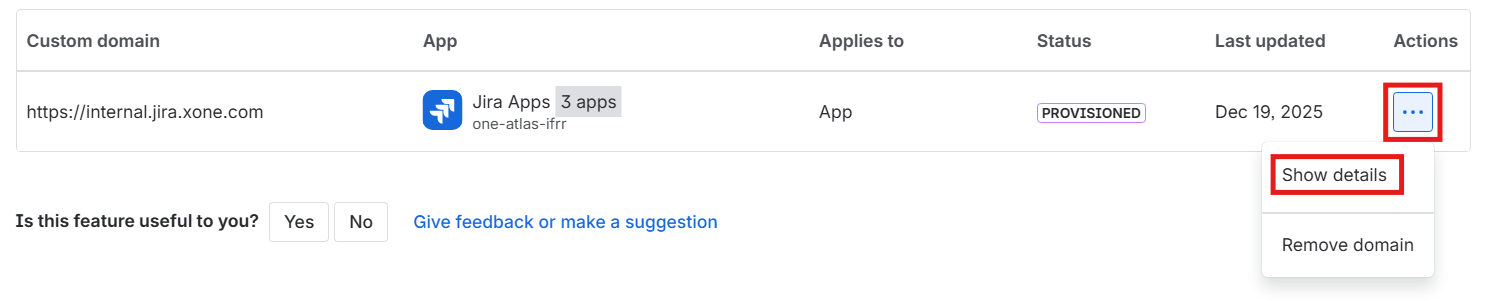
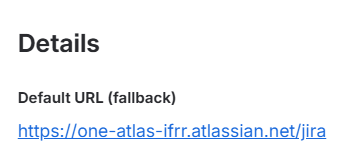
You can find organization's original URL in > **Apps** > **App URLs** > **Custom domains** > **Actions** > **Show details**.
The original URL is listed in the **Details** section under **Default URL (fallback)**.