> For the complete documentation index, see [llms.txt](https://helpcenter.xopero.com/xopero-one-en/llms.txt). Markdown versions of documentation pages are available by appending `.md` to page URLs; this page is available as [Markdown](https://helpcenter.xopero.com/xopero-one-en/backup-and-recovery/virtual-machines/vmware/backup/backup-options-and-features.md).
# Backup options & features
Overview of VMware backup options and features in Xopero ONE, including useful tools, transport methods, and backup capacity settings.
## Application aware
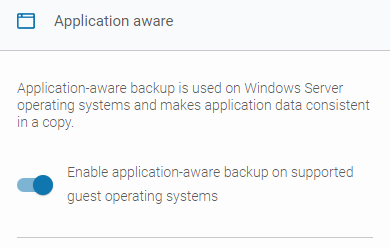
In **Xopero ONE**, when you're creating or editing a **VMware** backup plan, you can enable the **application-aware backup** option (available only for **Windows Server** versions). This allows you to create transactionally consistent backups or replicas of virtual machines.
This functionality relies on the **Microsoft VSS** (**Volume Shadow Copy Service**). **VSS** temporarily pauses the application and write requests (up to **60 seconds**), flushes the file system buffer, and freezes the file system. This process ensures that file system metadata is written and that data is saved in a consistent order.
***
## Changed Block Tracking (CBT)
The **Changed Block Tracking** (**CBT**) tool calculates and provides **Xopero** with the differences between full, differential, and incremental backups; it's a **VMware**-provided tool that **Xopero ONE** uses by default.
{% hint style="info" %}
If **CBT** is unavailable or you choose not to use it, you can enable the **Xopero ONE Classic Method** instead. In this case, the **Xopero ONE** agent calculates the differences between differential and incremental backup executions.
{% endhint %}
{% hint style="success" %}
It is recommended to use the **Xopero ONE virtual appliance** for **VMware** backups. If you choose to use the **Xopero ONE Classic Method**, the **agent** installed on the **virtual appliance** will handle the calculation of changes.
{% endhint %}
### Configuration
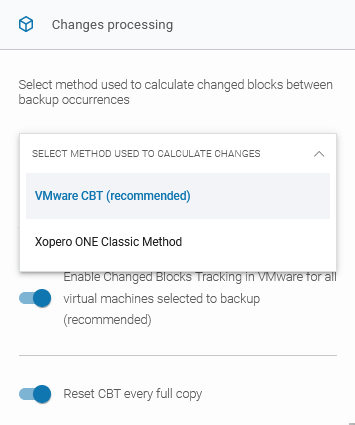
The method for calculating changes can be selected from the drop-down list. When **VMware CBT (recommended)** is selected, you can configure two additional checkboxes:
1. **Enable Change Blocks Tracking in VMware for all virtual machines selected for backup (recommended)** — when this option is enabled, **CBT** will be used for all protected virtual machines.
2. **Reset CBT every full copy** — when enabled, **CBT** will be reset during each full backup. Since **CBT** leaves markers indicating where the last changes occurred, this option clears those markers to prevent potential issues.
***
## Transport methods
Following are all transport methods available in **VMware** backup settings:
1. **Automatic (recommended)** — **Xopero ONE** will automatically determine the best available transport method for each worker and apply it accordingly.
2. **HotAdd** — available only for **virtual appliance workers** (see [this article](/xopero-one-en/backup-and-recovery/virtual-machines/vmware/integration/virtual-appliance.md) for more details). This method creates a snapshot and a linked clone of the target virtual machine. The disk is then attached to the **worker**, which reads the linked clone’s virtual disks for backup.
3. **SAN** — this mode requires the backup server to have access to the **SAN** storage containing the virtual disks. A **SAN backup worker** must be a physical machine. In this mode, data is read directly from the **VMware LUN** storage where the virtual disks are located.
4. **LAN** — also called **NBD**/**NBDSSL**. In this mode, the **ESXi** host reads data from the storage and sends it over the network to the worker. This method is typically used when no other transport option is available.
***
## Skip SWAP and empty blocks
This feature skips **SWAP** partitions and files, as well as empty blocks. By using it, you can reduce the backup size and the time required to transfer the backup to storage.
This feature is enabled by default. Administrators can configure two additional settings:
1. **Skip SWAP files, and partitions** — **SWAP** files and partitions will be excluded from the backup.
2. **Skip empty blocks** — all empty blocks will be skipped during the backup.
***
## Disk consolidation
**Disk consolidation** option forces consolidation of the source machine's disks on the **VMware** side before taking a snapshot to ensure virtual disk consistency and optimize I/O performance.
***
## Useful links and items
{% content-ref url="/pages/SXOVkShrma2WqK5eDCy6" %}
[Virtual appliance](/xopero-one-en/backup-and-recovery/virtual-machines/vmware/integration/virtual-appliance.md)
{% endcontent-ref %}
{% embed url="" %}