> For the complete documentation index, see [llms.txt](https://helpcenter.xopero.com/xopero-one-en/llms.txt). Markdown versions of documentation pages are available by appending `.md` to page URLs; this page is available as [Markdown](https://helpcenter.xopero.com/xopero-one-en/management/backup-plans/scripts.md).
# Scripts
Learn about backup scripts, when they run, and how to use them effectively.
## Overview
#### There are three types of backup scripts:
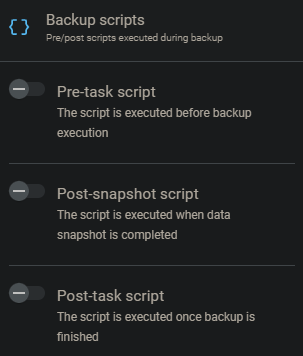
1. **Pre-backup** – executed before the backup starts. You can configure the backup to wait until this script finishes, which is mandatory for scenarios like **SQL** database backups.
2. **Post-snapshot** – executed after the backup snapshots have been created.
3. **Post-backup** – executed after the backup completes. For example, this script can be used to shut down the backed-up machine.
***
## Advantages
Using backup scripts can help automate the backup of resources that **Xopero ONE** cannot back up natively. **Xopero ONE** also provides features such as incremental and differential backups, deduplication, flexible scheduling, and detailed monitoring of backup copies.
***
## Enabling backup scripts
{% stepper %}
{% step %}
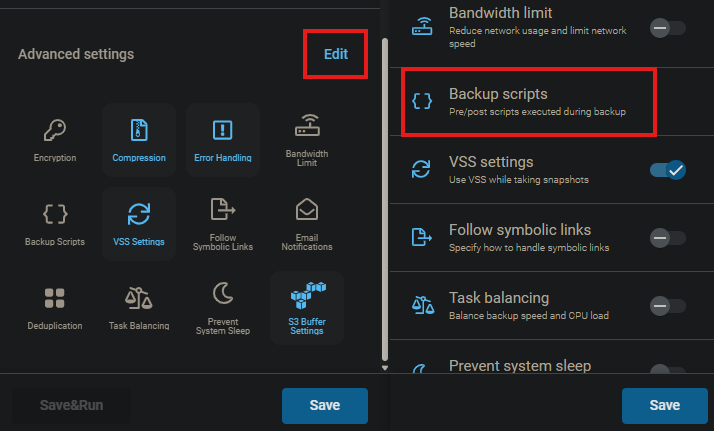
In the **Create backup plan** view, scroll to the bottom, click **Edit** next to **Advanced settings**, and then select **Backup scripts**.
{% endstep %}
{% step %}
Select the type of script you want to enable.
{% hint style="success" %}
You can enable multiple scripts at the same time.
{% endhint %}
{% endstep %}
{% step %}
Select the operating system (**Windows**, **Linux**, or **macOS**) and choose a [predefined script](#types_of_pre-defined_scripts) from the drop-down list.
{% endstep %}
{% step %}
If you have selected a script, enable the **Wait for the script to continue the task** checkbox. This ensures that the backup task will wait until the script finishes. You can also configure a waiting interval and choose to fail the task if the script does not complete successfully.
{% endstep %}
{% endstepper %}
***
## Predefined scripts
**Xopero ONE** provides a set of predefined scripts that can be used for common backup tasks. These scripts are ready to use and can be selected directly from the drop-down list when configuring your backup plan.
{% hint style="success" %}
Custom pre- and post-task scripts can identify the current backup type by using the `__XOPERO_BACKUP_TYPE__` argument. When this argument is included in a script, it is dynamically replaced at runtime with a specific string value corresponding to the current backup type, injecting `Full` for a full backup, `Incremental` for an incremental backup, `Differential` for a differential backup, or `SyntheticFull` for a synthetic full backup.
{% endhint %}
### Pre-task scripts
{% hint style="warning" %}
The script is executed before the backup starts.
{% endhint %}
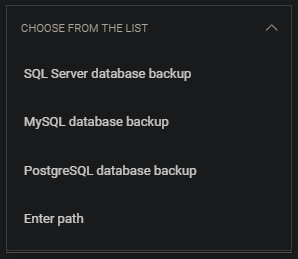
Windows OS.
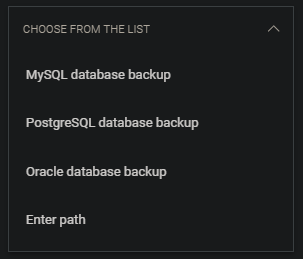
Linux and macOS.
1. **SQL Server database backup** — protects a **Microsoft SQL** server database (**Windows** only).
2. **MySQL database backup** — protects a **MySQL** database (**Windows**, **Linux**, and **macOS**).
3. **PostgreSQL database backup** — protects a **PostgreSQL** database (**Windows**, **Linux**, and **macOS**).
4. **Oracle database backup** — protects an **Oracle** database environment (**Linux** and **macOS** only).
5. **Enter path\*** — allows you to run a custom script; simply type the path to your script to execute it using **Xopero ONE** (**Windows**, **Linux**, and **macOS**).
### Post-snapshot scripts
{% hint style="warning" %}
The script is executed after the data snapshot has been completed.
{% endhint %}
Windows OS.
1. **SQL Server database backup** — protects a **Microsoft SQL** server database.
2. **MySQL database backup** — protects a **MySQL** database.
3. **PostgreSQL database backup** — protects a **PostgreSQL** database.
4. **Enter path\*** — allows you to run a custom script; simply type the path to your script to execute it using **Xopero ONE**.
### Post-task scripts
{% hint style="warning" %}
The script is executed after the backup is completed.
{% endhint %}
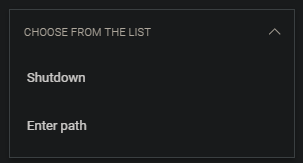
1. **Shutdown** — shuts down the device.
2. **Enter path\*** — allows you to run a custom script; simply type the path to your script to execute it using **Xopero ONE**.
{% hint style="danger" %}
**\*****WARNING!** If your backup plan includes multiple devices, the script **must** be located at the same path on all devices where you want it to run.
{% endhint %}
***
## Useful links and items
{% content-ref url="/pages/MLP0XDkxZ7U4QtwyzUCP" %}
[Microsoft SQL database backup](/xopero-one-en/backup-and-recovery/workstations-and-servers/database-backup/microsoft-sql-database-backup.md)
{% endcontent-ref %}
{% content-ref url="/pages/IVeDEpwr5CDqeJWUlHoy" %}
[Restoring MySQL database](/xopero-one-en/backup-and-recovery/workstations-and-servers/database-backup-recovery/restoring-mysql-database.md)
{% endcontent-ref %}
{% content-ref url="/pages/FDJAMMAXmLDUywGtjt6S" %}
[PostgreSQL database backup](/xopero-one-en/backup-and-recovery/workstations-and-servers/database-backup/postgresql-database-backup.md)
{% endcontent-ref %}
{% content-ref url="/pages/brnXKoSSfF6b5PK8adqg" %}
[Oracle database backup](/xopero-one-en/backup-and-recovery/workstations-and-servers/database-backup/oracle-database-backup.md)
{% endcontent-ref %}