# Repositories dashboard

#### Detailed information about active repositories can be viewed from the repository list view. You can open the repository list using the Explore button in your DevOps organization dashboard.

***

## Detailed info view

In the repository list view, click the **info** <img src="https://319733277-files.gitbook.io/~/files/v0/b/gitbook-x-prod.appspot.com/o/spaces%2F0CBTl43C3OO6ySL1DJ6k%2Fuploads%2FtozYyUZ0RQW6Ij7GAhef%2Fimage.png?alt=media&#x26;token=488794cb-0f8d-4e8d-b2be-513ff8b8663a" alt="" data-size="line"> icon next to the repository you want to check to open the detailed info aside.

<figure><img src="https://319733277-files.gitbook.io/~/files/v0/b/gitbook-x-prod.appspot.com/o/spaces%2F0CBTl43C3OO6ySL1DJ6k%2Fuploads%2FcyqIG8KO6JbKsuafKPZd%2Fimage.png?alt=media&#x26;token=99bf0b30-4bec-4746-8372-e8b777b0b9bc" alt=""><figcaption></figcaption></figure>

***

## Repository details

Repository details aside is split into 4 separate tiles with different information about your repository and backup.

### <mark style="background-color:blue;">Repository status</mark>

<figure><img src="https://319733277-files.gitbook.io/~/files/v0/b/gitbook-x-prod.appspot.com/o/spaces%2F0CBTl43C3OO6ySL1DJ6k%2Fuploads%2FIGRoMHHjDdo5BbFjnn3G%2Fimage.png?alt=media&#x26;token=9084bf8c-eb19-4386-8dd0-8be571e70dd9" alt=""><figcaption></figcaption></figure>

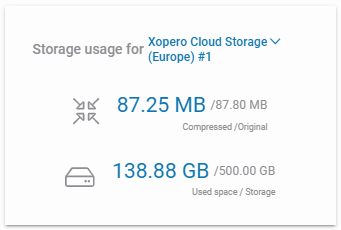
### <mark style="background-color:blue;">Storage usage</mark>

<figure><img src="https://319733277-files.gitbook.io/~/files/v0/b/gitbook-x-prod.appspot.com/o/spaces%2F0CBTl43C3OO6ySL1DJ6k%2Fuploads%2FEDdbwiWkAJ2NPe62LX0m%2Fimage.png?alt=media&#x26;token=66fe3f80-fe09-4eb6-9fb8-770fda2607d4" alt=""><figcaption></figcaption></figure>

### <mark style="background-color:blue;">Backup plans</mark>

<figure><img src="https://319733277-files.gitbook.io/~/files/v0/b/gitbook-x-prod.appspot.com/o/spaces%2F0CBTl43C3OO6ySL1DJ6k%2Fuploads%2FtbQ6A9ySrcNRJjI3APJH%2Fimage.png?alt=media&#x26;token=6e607d68-a3d6-4994-9ca8-56e8abcffb5f" alt=""><figcaption></figcaption></figure>

### <mark style="background-color:blue;">Statistics and notifications</mark>

<figure><img src="https://319733277-files.gitbook.io/~/files/v0/b/gitbook-x-prod.appspot.com/o/spaces%2F0CBTl43C3OO6ySL1DJ6k%2Fuploads%2FjsKuzPuvrrcnvMzs0XoJ%2Fimage.png?alt=media&#x26;token=73077998-27fd-4206-ba88-9b649be109a1" alt=""><figcaption></figcaption></figure>