> For the complete documentation index, see [llms.txt](https://helpcenter.xopero.com/xopero-one-en/llms.txt). Markdown versions of documentation pages are available by appending `.md` to page URLs; this page is available as [Markdown](https://helpcenter.xopero.com/xopero-one-en/pl/kopia-zapasowa-i-przywracanie/devops/gitlab/integracja/dodawanie-organizacji-gitlab-self-managed-do-xopero-one.md).
# Dodawanie organizacji GitLab (self-managed) do Xopero ONE
Niniejszy artykuł wyjaśnia, jak dodać organizację GitLab (self-managed) do platformy Xopero ONE aby zabezpieczyć repozytoria, lub przywrócić istniejące kopie zapasowe.
## Używając Osobistego tokena dostępu (PAT)
{% stepper %}
{% step %}
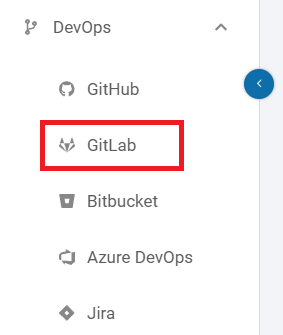
Zaloguj się do [**XMS**](#user-content-fn-1)[^1], otwórz kartę **DevOps** po lewej stronie okna i wybierz **GitLab** z listy.
{% endstep %}
{% step %}
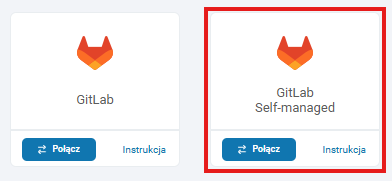
Kliknij przycisk **Połącz** pod **GitLab Self-managed**.
{% endstep %}
{% step %}
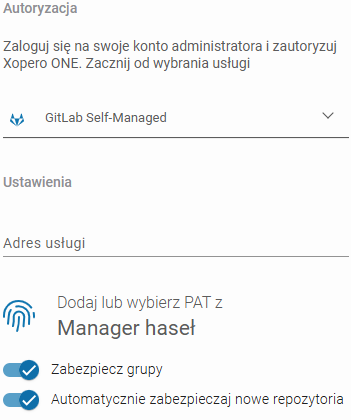
Ustaw metodę uwierzytelniania:
1. W **Uwierzytelnianie**, wybierz **GitLab Self-Managed**.
2. W **Ustawieniach**, wprowadź **adres IP usługi GitLab**.
3. Dodaj lub wybierz **PAT** z **Managera haseł**.
4. Wybierz czy **Xopero** ma automatycznie zabezpieczać nowe repozytoria oraz czy w backupie powinny zostać uwzględnione grupy **GitLab**.
{% endstep %}
{% step %}
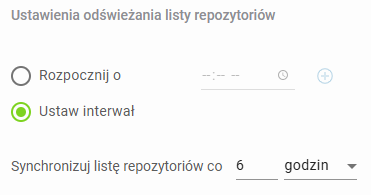
Skonfiguruj odświeżanie repozytoriów i domyślnego workera. Określ godziny synchronizacji lub ustaw interwał czasowy dla automatycznych aktualizacji.
{% endstep %}
{% step %}
Kliknij **Kontynuuj** aby zakończyć dodawanie organizacji **GitLab (self-managed)** i nadać **Xopero** **ONE** dostęp do określonych zasobów
{% endstep %}
{% endstepper %}
[^1]: Xopero ONE Management Service