> For the complete documentation index, see [llms.txt](https://helpcenter.xopero.com/xopero-one-en/llms.txt). Markdown versions of documentation pages are available by appending `.md` to page URLs; this page is available as [Markdown](https://helpcenter.xopero.com/xopero-one-en/pl/kopia-zapasowa-i-przywracanie/maszyny-wirtualne/vmware/integracja/dodawanie-serwera-vmware-do-xopero-one.md).
# Dodawanie serwera VMware do Xopero ONE
Niniejszy artykuł wyjaśnia, jak dodać serwer VMware ESXi lub vCenter do Xopero ONE.
{% hint style="warning" %}
Aby dodać serwer **VMware** do **Xopero** **ONE**, musisz mieć w tej samej sieci co najmniej jedno urządzenie z zainstalowanym agentem **Xopero** **ONE**. Urządzenie to zajmie się wstępną komunikacją z **VMware**.
{% endhint %}
{% stepper %}
{% step %}
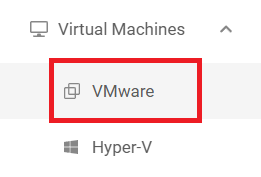
Zaloguj się do [**XMS**](#user-content-fn-1)[^1], otwórz kartę **Maszyny Wirtualne** po lewej stronie okna, a następnie wybierz **VMware** z listy.
{% endstep %}
{% step %}
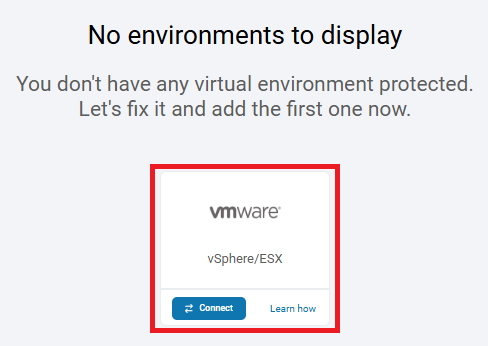
Kliknij przycisk **Połącz** pod **vSphere/ESX**.
{% endstep %}
{% step %}
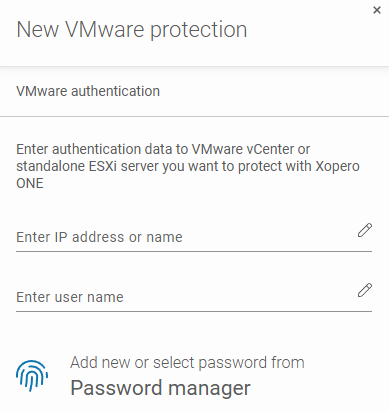
Podaj **adres IP** lub **nazwę serwera VMware**, wprowadź **nazwę użytkownika** oraz dodaj lub wybierz hasło z **Managera haseł**.
{% hint style="warning" %}
Potrzebujesz **konta administratora** dla **hosta VMware**.
{% endhint %}
{% endstep %}
{% step %}
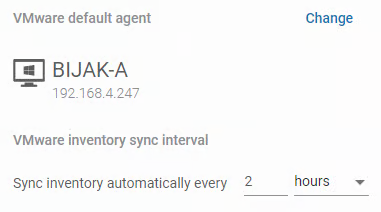
Wybierz domyślnego **agenta VMware** — urządzenie, które może komunikować się z **VMware** i zajmie się dodaniem go do **Xopero ONE**.
{% hint style="danger" %}
Urządzenia z systemem **macOS** nie są wspierane jako urządzenia do rejestracji **VMware** w **Xopero ONE**.
{% endhint %}
{% endstep %}
{% step %}
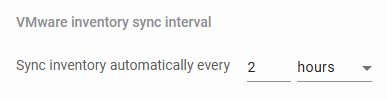
Określ częstotliwość, z jaką serwer **VMware** ma być odświeżany.
{% endstep %}
{% step %}
Po wypełnieniu formularza kliknij **Dalej,** aby kontynuować. Po wykonaniu wszystkich wymaganych kroków, możesz rozpocząć planowanie swojej strategii backupu **VMware**.
{% endstep %}
{% endstepper %}
[^1]: Xopero ONE Management Service