> For the complete documentation index, see [llms.txt](https://helpcenter.xopero.com/xopero-one-en/llms.txt). Markdown versions of documentation pages are available by appending `.md` to page URLs; this page is available as [Markdown](https://helpcenter.xopero.com/xopero-one-en/pl/kopia-zapasowa-i-przywracanie/stacje-robocze-i-serwery/backup-bazy-danych/przygotowanie-systemu-linux-do-backupu-oracle.md).
# Przygotowanie systemu Linux do backupu Oracle
Niniejszy artykuł opisuje, jak przygotować system operacyjny Linux do tworzenia backupu środowiska bazy danych Oracle.
#### Backup bazy danych Oracle polega na wygenerowaniu pliku database dump używając skryptów backupu a następnie zabezpieczaniu wygenerowanego pliku dump.
***
## Proces przygotowywania systemu Linux
{% hint style="warning" %}
**Agent Xopero ONE** wymaga dostępu narzędzi `rman` oraz `sqlplus`. Przed rozpoczęciem upewnij się, że te narzędzia są zainstalowane i dostępne.
{% endhint %}
{% stepper %}
{% step %}
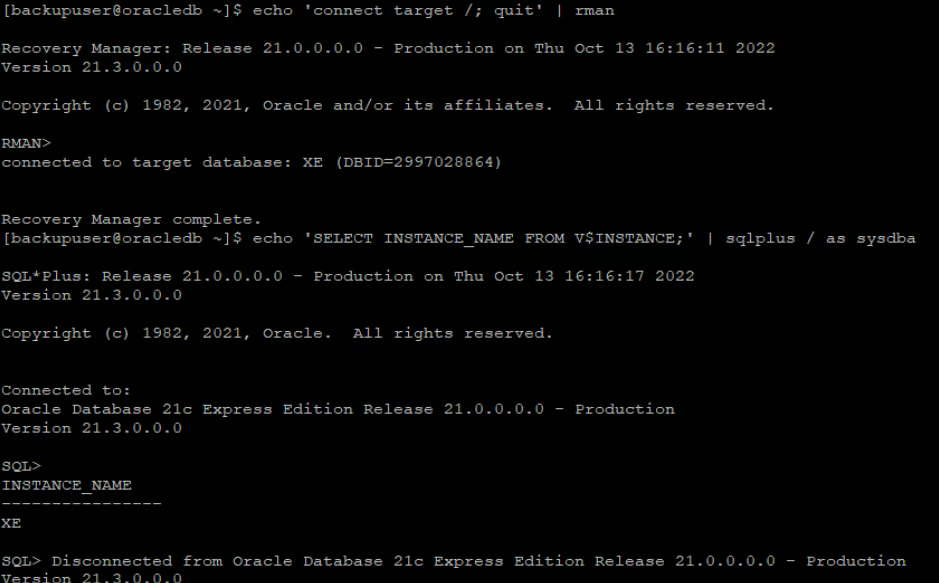
Używając wiersza poleceń **Linux**, zaloguj się na konto używane do tworzenia backupu **bazy danych Oracle** i wykonaj następujące polecenia:
```bash
echo 'connect target /; quit' | rman
```
```bash
echo 'SELECT INSTANCE_NAME FROM V$INSTANCE;' | sqlplus / as sysdba
```
{% endstep %}
{% step %}
Jeśli te narzędzia są niedostępne (przykład poniżej), musisz skonfigurować **zmienne środowiskowe**.
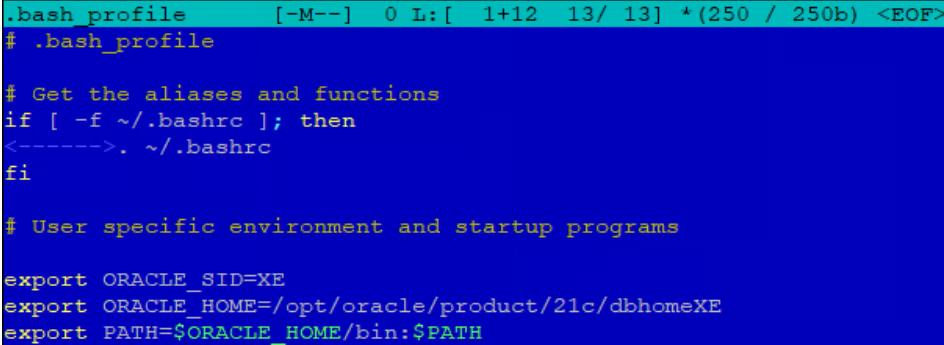
1. Edytuj plik `/home//.bash_profile` i **dodaj** następujące wpisy:
```bash
export ORACLE_SID=
```
```bash
export ORACLE_HOME=database_directory
```
{% hint style="info" %}
`database_directory` określa lokalizację bazy danych **Oracle**.
{% endhint %}
```bash
export PATH=$ORACLE_HOME/bin:$PATH
```
Przykład poprawnie skonfigurowanych zmiennych środowiskowych.
2. Teraz, po ponownym zalogowaniu, wykonanie następujących poleceń powinno zakończyć się pomyślnie.
```bash
echo 'connect target /; quit' | rman
```
```bash
echo 'SELECT INSTANCE_NAME FROM V$INSTANCE;' | sqlplus / as sysdba
```
{% endstep %}
{% step %}
Po wykonaniu tych czynności system **Linux** powinien być gotowy do tworzenia backupu **środowiska Oracle**.
{% endstep %}
{% endstepper %}