> For the complete documentation index, see [llms.txt](https://helpcenter.xopero.com/xopero-one-en/llms.txt). Markdown versions of documentation pages are available by appending `.md` to page URLs; this page is available as [Markdown](https://helpcenter.xopero.com/xopero-one-en/pl/magazyny-danych/magazyn-lokalny/dodawanie-nowego-magazynu/udzial-smb.md).

# Udział SMB

{% stepper %}
{% step %}
Zaloguj się do swojego panelu administratora **Xopero ONE Management Service** (**XMS**), otwórz zakładkę **Magazyny** i kliknij przycisk **(+) Dodaj magazyn**.
{% endstep %}

{% step %}
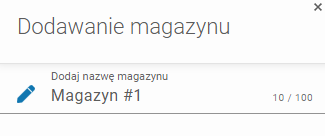
W formularzu **Dodaj magazyn**, zdefiniuj nazwę magazynu.

<figure><img src="/files/JTGLIsr17VJ4SBcgXuIg" alt=""><figcaption></figcaption></figure>
{% endstep %}

{% step %}
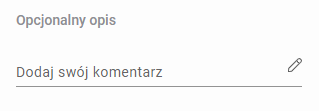
W razie potrzeby dodaj opcjonalny opis (poniżej).

<figure><img src="/files/RmOTpkNidkOod1Wpd43v" alt=""><figcaption></figcaption></figure>
{% endstep %}

{% step %}
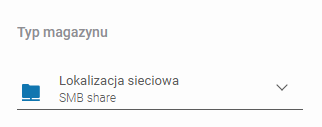
Rozwiń listę **Typów magazynu** i wybierz **Lokalizacja sieciowa (SMB share)**.

<figure><img src="/files/phW0GQtHotI8z2VHyZWU" alt=""><figcaption></figcaption></figure>
{% endstep %}

{% step %}
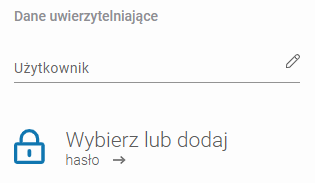
Wprowadź **Nazwę użytkownika** i wybierz (lub dodaj) hasło, upewniając się, że <mark style="color:red;">**są one zgodne z poświadczeniami domenowymi powiązanymi z lokalizacją sieciową**</mark>.

{% hint style="info" %}
Dowiedz się więcej o korzystaniu z **Managera haseł** [tutaj](/xopero-one-en/pl/zarzadzanie/manager-hasel.md).
{% endhint %}

<figure><img src="/files/LwIc2T3l7umshUo7GtVS" alt=""><figcaption></figcaption></figure>
{% endstep %}

{% step %}
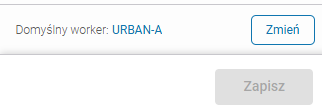
Upewnij się, że urządzenie przeglądające (worker) może wykryć magazyn. Użyj przycisku **Zmień**, aby wybrać **Maszynę przeglądającą** spośród urządzeń przypisanych do **Xopero ONE**, która połączy zasób udostępniony z systemem.

<figure><img src="/files/XJGwGd7Hj8qvaHGOGdoa" alt=""><figcaption></figcaption></figure>
{% endstep %}

{% step %}
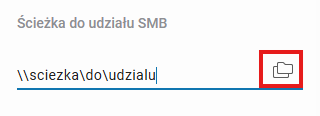
Wprowadź ścieżkę lub adres serwera zawierającego zasób w polu **Ścieżka do udziału SMB**.

<figure><img src="/files/JIx08MSxzvDrVSPFypwi" alt=""><figcaption></figcaption></figure>
{% endstep %}

{% step %}
Korzystając z drugiej opcji (**adres serwera**), możesz przeglądać zasoby serwera — kliknij ikonę **Folderów**, aby zobaczyć dostępne opcje udziałów na serwerze.

<figure><img src="/files/Fb3c4S0KJwtieWmiJf2W" alt=""><figcaption></figcaption></figure>
{% endstep %}

{% step %}
Wybierz udział, w którym chcesz przechowywać swoje dane i kliknij **Zastosuj**.
{% endstep %}

{% step %}
Aby zakończyć konfigurację magazynu, kliknij **Zapisz**.
{% endstep %}
{% endstepper %}
---

# Agent Instructions
This documentation is published with GitBook. GitBook is the documentation platform designed so that both humans and AI agents can read, navigate, and reason over technical content effectively. Learn more at gitbook.com.

## Querying This Documentation
If you need additional information that is not directly available in this page, you can query the documentation dynamically by asking a question.

Perform an HTTP GET request on the current page URL with the `ask` query parameter, and the optional `goal` query parameter:

```
GET https://helpcenter.xopero.com/xopero-one-en/pl/magazyny-danych/magazyn-lokalny/dodawanie-nowego-magazynu/udzial-smb.md?ask=<question>&goal=<endgoal>
```

`ask` is the immediate question: it should be specific, self-contained, and written in natural language.
`goal` is optional and describes the broader end goal you are ultimately trying to accomplish on behalf of the user. GitBook uses it to tailor the answer towards what is most useful for that goal.

The response will contain a direct answer to the question and relevant excerpts and sources from the documentation.

Use this mechanism when the answer is not explicitly present in the current page, you need clarification or additional context, or you want to retrieve related documentation sections.