> For the complete documentation index, see [llms.txt](https://helpcenter.xopero.com/xopero-one-en/llms.txt). Markdown versions of documentation pages are available by appending `.md` to page URLs; this page is available as [Markdown](https://helpcenter.xopero.com/xopero-one-en/pl/magazyny-danych/magazyn-w-chmurze/aws-s3/zasady-iam.md).
# Zasady IAM
W tym artykule wyjaśniono, jak zintegrować zasobnik (bucket) przy użyciu zasad IAM zamiast klucza dostępu i tajnego klucza (access key/secret key).
## Konfiguracja polityki IAM
Aby **zwiększyć poziom bezpieczeństwa** i **wyeliminować użycie tokenów**, możesz **wyłączyć klucze dostępu i klucze poufne** dla swoich **zasobników (bucketów) AWS** oraz skorzystać z **integracji za pomocą zasad IAM**. Takie podejście ma jednak określone wymagania — **integracja zasobnika przy użyciu zasad IAM** wymaga utworzenia **zasady IAM** dostępnej dla usługi **Amazon EC2** oraz wskazania **instancji EC2**, która może komunikować się bezpośrednio z zasobnikiem.
Ponieważ **szablon maszyny Xopero** **nie jest dostępny** w środowisku **EC2**, należy utworzyć instancję z obsługiwanym systemem operacyjnym i zainstalować na niej **agenta Xopero**.
{% hint style="warning" %}
Agent w chmurze (cloud worker) domyślnie **nie może się komunikować** z zasobnikiem za pomocą zasad IAM.
{% endhint %}
Kroki dla administratora **AWS**:
1. Utwórz rolę IAM dostępną dla **instancji EC2**.
2. Dodaj politykę do utworzonej roli.
3. Przypisz rolę do wybranej **instancji EC2**.
4. Zainstaluj agenta kopii zapasowej na instancji **EC2**.
{% code title="Policy" %}
```json
{
"Version": "2012-10-17",
"Statement": [
{
"Sid": "VisualEditor1",
"Effect": "Allow",
"Action": [
"s3:"
],
"Resource": [
"arn:aws:s3:::[bucket_name]",
"arn:aws:s3:::[bucket_name]/",
"arn:aws:s3:::[bucket_name]/"
]
}
]
}
```
{% endcode %}
***
## Włączanie uwierzytelniania IAM
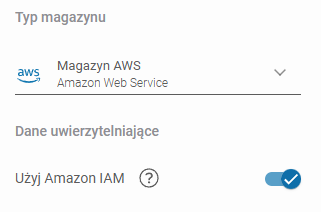
W panelu administratora **Xopero ONE Management Service** (**XMS**), włącz przełącznik **Użyj Amazon IAM** i wybierz agenta w instancji **EC2,** w sekcji **Domyślny worker** na dole.
***
## Przydatne linki i materiały
{% embed url="" %}