> For the complete documentation index, see [llms.txt](https://helpcenter.xopero.com/xopero-one-en/llms.txt). Markdown versions of documentation pages are available by appending `.md` to page URLs; this page is available as [Markdown](https://helpcenter.xopero.com/xopero-one-en/pl/plany-i-funkcje-kopii-zapasowych/usuwanie-kopii-zapasowych/usuwanie-wszystkich-kopii-z-wybranego-magazynu.md).
# Usuwanie wszystkich kopii z wybranego magazynu
Ten artykuł opisuje, jak usunąć wszystkie kopie z wybranego magazynu na platformie Xopero ONE.
{% hint style="warning" %}
Ta operacja **nie jest dostępna** typów magazynu w postaci lokalnego katalogu.
{% endhint %}
{% stepper %}
{% step %}
W [**XMS**](#user-content-fn-1)[^1], przejdź do zakładki **Magazny** i kliknij przycisk **Przeglądaj magazyn** obok wybranego magazynu.
{% endstep %}
{% step %}
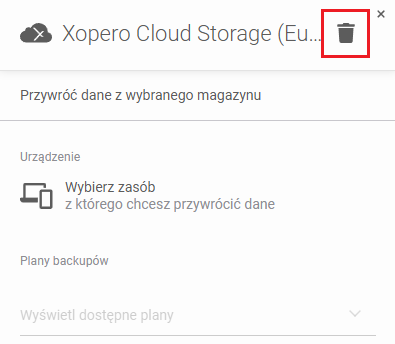
W panelu informacji o magazynie, kliknij przycisk **Usuń backupy z** w prawym górnym rogu panelu.
{% endstep %}
{% step %}
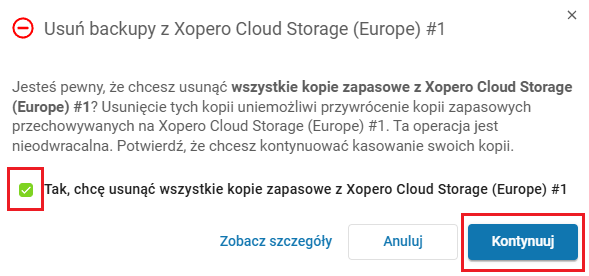
Potwierdź, że chcesz usunąć swoje dane, zaznaczając **Tak, chcę usunąć wszystkie kopie zapasowe z \[NAZWA]**, następnie kliknij przycisk **Kontynuuj**.
{% hint style="success" %}
Dodatkowo możesz skorzystać z opcji **Zobacz szczegóły**, aby przejrzeć twórców kopii, powiązane plany backupu oraz lokalizacje magazynów, które zostaną usunięte. Funkcja ta zapewnia pełną przejrzystość i pozwala upewnić się, jaki będzie zakres operacji przed jej wykonaniem.
{% endhint %}
{% endstep %}
{% step %}
Po potwierdzeniu rozpocznie się proces usuwania — jego postęp można monitorować w zakładce **Zadania**. Należy pamiętać, że w zależności od ilości danych, opróżnianie magazynu może potrwać trochę czasu.
{% endstep %}
{% endstepper %}
[^1]: Xopero ONE Management Service
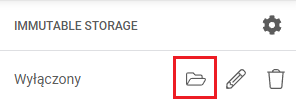
 obok wybranego magazynu.
 w prawym górnym rogu panelu.