# Restartowanie usługi agenta Xopero ONE

## Windows  <a href="#windows" id="windows"></a>

### <mark style="background-color:blue;">Używając Managera Zadań</mark> <a href="#via_task_manager" id="via_task_manager"></a>

{% stepper %}
{% step %}
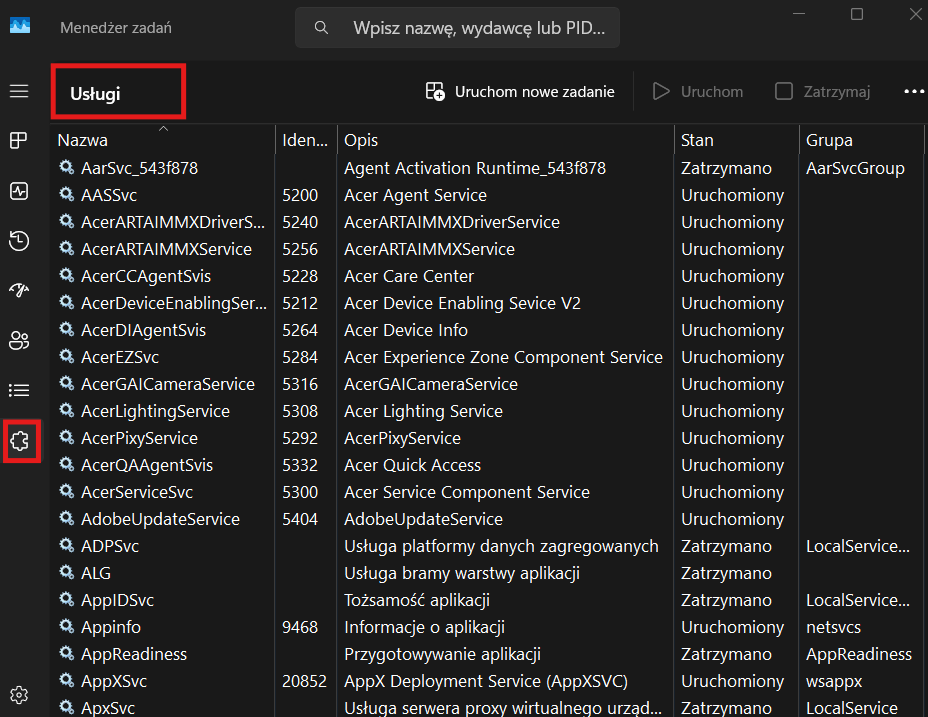
Otwórz **Managera Zadań** i przejdź do zakładki **Usługi**.

<figure><img src="/files/f70Wl7U7SrOBdziQEMEM" alt="" width="563"><figcaption></figcaption></figure>
{% endstep %}

{% step %}
Znajdź usługę **XoperoONEBackupAgent**, liknij ją prawym przyciskiem myszy i wybierz opcję **Restart**.
{% endstep %}
{% endstepper %}

### <mark style="background-color:blue;">Za pomocą wiersza polecenia</mark> <a href="#via_command_prompt" id="via_command_prompt"></a>

{% stepper %}
{% step %}
Otwórz **Wiersz polecenia** (**cmd**) i wykonaj następującą komendę:

<pre data-overflow="wrap"><code><strong>net stop XoperoONEBackupAgent &#x26;&#x26; net start XoperoONEBackupAgent
</strong></code></pre>

<figure><img src="/files/hMeSy6WL4IEi4z2vsfLd" alt=""><figcaption></figcaption></figure>
{% endstep %}
{% endstepper %}

***

## Linux <a href="#linux" id="linux"></a>

{% stepper %}
{% step %}
Otwórz **Terminal** i uruchom poniższe polecenie:

```bash
systemctl restart XoperoONEBackupAgent.service
```

<figure><img src="/files/OQEAXobrgf5THRumruUd" alt="Linux&#x27;s terminal window"><figcaption></figcaption></figure>
{% endstep %}
{% endstepper %}

***

## MacOS <a href="#macos" id="macos"></a>

{% stepper %}
{% step %}
Otwórz **Terminal** i wykonaj następujące komendy:

{% code overflow="wrap" %}

```bash
stop com.xopero.packages.XoperoONEBackupAgent
```

{% endcode %}

{% code overflow="wrap" %}

```bash
start com.xopero.packages.XoperoONEBackupAgent
```

{% endcode %}

<figure><img src="/files/c95GmkNzLSqCKC1QHs89" alt="MacOS&#x27; terminal window"><figcaption></figcaption></figure>
{% endstep %}
{% endstepper %}


---

# Agent Instructions: Querying This Documentation

If you need additional information that is not directly available in this page, you can query the documentation dynamically by asking a question.

Perform an HTTP GET request on the current page URL with the `ask` query parameter:

```
GET https://helpcenter.xopero.com/xopero-one-en/pl/rozwiazywanie-problemow/restartowanie-uslugi-agenta-xopero-one.md?ask=<question>
```

The question should be specific, self-contained, and written in natural language.
The response will contain a direct answer to the question and relevant excerpts and sources from the documentation.

Use this mechanism when the answer is not explicitly present in the current page, you need clarification or additional context, or you want to retrieve related documentation sections.