# Konfiguracja serwera SMTP

{% hint style="warning" %}
Ustawienia konfiguracji serwera SMTP są dostępne <mark style="color:$danger;">**wyłącznie dla usług Xopero wdrożonych w modelu on-premise**</mark>.
{% endhint %}

## Konfiguracja serwera

{% stepper %}
{% step %}
Przejdź do ⚙ **Ustawienia** > **Powiadomienia email** i kliknij tą sekcję aby rozwinąć jej ustawienia.
{% endstep %}

{% step %}
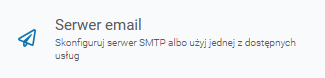
Rozwiń kartę **Serwer email**.

<figure><img src="https://1873867500-files.gitbook.io/~/files/v0/b/gitbook-x-prod.appspot.com/o/spaces%2Fwg6DDqlTFok8F9zv6rqa%2Fuploads%2FTK2U2k3Nb8GoS7JY3DPw%2Fimage.png?alt=media&#x26;token=e0434805-268e-4195-8552-a679067fe074" alt=""><figcaption></figcaption></figure>
{% endstep %}

{% step %}
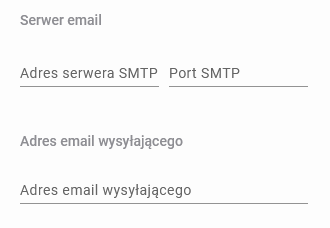
Określ konfigurację serwera SMTP:

1. Wprowadź adres **IP serwera SMTP i port SMTP**.
2. Wprowadź **adres e-mail nadawcy**.

<figure><img src="https://1873867500-files.gitbook.io/~/files/v0/b/gitbook-x-prod.appspot.com/o/spaces%2Fwg6DDqlTFok8F9zv6rqa%2Fuploads%2FHDXOQoOf7vEChewFCRcg%2Fimage.png?alt=media&#x26;token=c32c1745-bf8c-40ca-a9be-f2a0c9688286" alt=""><figcaption></figcaption></figure>
{% endstep %}

{% step %}
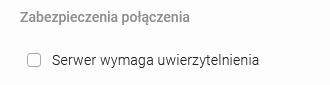
Jeśli serwer wymaga uwierzytelniania:

1. Zaznacz pole wyboru **Serwer wymaga uwierzytelniania**, aby wyświetlić dodatkowe ustawienia.
2. Wprowadź login i wybierz hasło z **Managera haseł** albo dodaj nowe.

<figure><img src="https://1873867500-files.gitbook.io/~/files/v0/b/gitbook-x-prod.appspot.com/o/spaces%2Fwg6DDqlTFok8F9zv6rqa%2Fuploads%2FelPZI1oyhojBu92t01ii%2Fimage.png?alt=media&#x26;token=c8c64752-a599-4f85-ab3f-86717f7365f5" alt=""><figcaption></figcaption></figure>
{% endstep %}

{% step %}
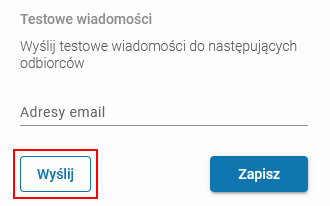
Opcjonalnie wyślij **wiadomość testową**, aby zweryfikować poprawność ustawień.

<figure><img src="https://1873867500-files.gitbook.io/~/files/v0/b/gitbook-x-prod.appspot.com/o/spaces%2Fwg6DDqlTFok8F9zv6rqa%2Fuploads%2FJNYF8AMf8MrlTXqBBztM%2Fimage.png?alt=media&#x26;token=5fbc39e4-29bb-4077-8d0a-a7f0e4da0979" alt=""><figcaption></figcaption></figure>
{% endstep %}

{% step %}
Przejrzyj swoje ustawienia i kliknij **Zapisz**, aby zakończyć konfigurację.
{% endstep %}
{% endstepper %}
---

# Agent Instructions: Querying This Documentation

If you need additional information that is not directly available in this page, you can query the documentation dynamically by asking a question.

Perform an HTTP GET request on the current page URL with the `ask` query parameter:

```
GET https://helpcenter.xopero.com/xopero-one-en/pl/zarzadzanie/powiadomienia/powiadomienia-e-mail/konfiguracja-serwera-smtp.md?ask=<question>
```

The question should be specific, self-contained, and written in natural language.
The response will contain a direct answer to the question and relevant excerpts and sources from the documentation.

Use this mechanism when the answer is not explicitly present in the current page, you need clarification or additional context, or you want to retrieve related documentation sections.