> For the complete documentation index, see [llms.txt](https://helpcenter.xopero.com/xopero-one-en/llms.txt). Markdown versions of documentation pages are available by appending `.md` to page URLs; this page is available as [Markdown](https://helpcenter.xopero.com/xopero-one-en/storage/xopero-cloud-storage.md).
# Xopero Cloud Storage
Lorem ipsum.
## Overview
**Xopero Cloud Storage** is a storage provided by **Xopero** that can be used in both SaaS and on-premise models. To view **Xopero Cloud**, go to the **Storages** tab in your **Xopero ONE Management Service** (**XMS**) admin panel.
The ransomware-proof badge applies to **Xopero** storage cloud and similar **S3**-compatible object storages with **Object Lock** for immutability.
***
## Location
**Xopero Cloud Storage** can be located in America, Europe, the Middle East, and Africa. The storage is hosted in:
1. Virginia (for the US).
2. Sydney (for AUS).
3. Amsterdam (for EMEA).
{% hint style="success" %}
Depending on where the SaaS panel (**XMS**) is located, **Xopero Cloud Storage** will be located in a suitable location.
{% endhint %}
***
## Immutable storage
**Xopero** takes advantage of **WORM**-compliant storage technology— **WORM** (write once read many) is a data storage device in which information, once written, cannot be modified. This write protection affords the assurance that the data cannot be tampered with once it is written to the device, excluding the possibility of data loss from human error, computer bugs, or malware.
The comprehensive security suite includes:
* [x] Enable **Object Lock**
* [x] Enable versioning
* [x] Retention policy configuration
Data stored in **WORM** storage is considered immutable data— it can be read by authorized users, but the data is protected and cannot be edited, altered, or deleted.
{% hint style="info" %}
To enable immutable storage for **Xopero Cloud Storage**, please [contact us directly](https://xopero.com/contact/).
{% endhint %}
***
## Usage
{% hint style="success" %}
To extend your **Xopero Cloud Storage** size, please contact or one of our sales partners.
{% endhint %}
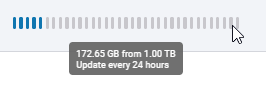
Information about storage usage is refreshed every 24 hours.