> For the complete documentation index, see [llms.txt](https://helpcenter.xopero.com/xopero-one-en/llms.txt). Markdown versions of documentation pages are available by appending `.md` to page URLs; this page is available as [Markdown](https://helpcenter.xopero.com/xopero-one-en/updates/xopero-one-management-service/update-on-windows.md).
# Update on Windows
This article describes the process of updating Xopero ONE Management Service on Windows computers.
#### The idea behind updating the Management Service is to complete a few steps in the installation wizard.
***
## Update process
{% hint style="info" %}
The below guide applies to **Xopero ONE Management Service** on-prem deployment model.
{% endhint %}
{% stepper %}
{% step %}
Open the **Task Manager**, then go to the **Services** tab.
{% endstep %}
{% step %}
Find and stop **XoperoONEManagementService** task (right-click > **Stop**).
{% endstep %}
{% step %}
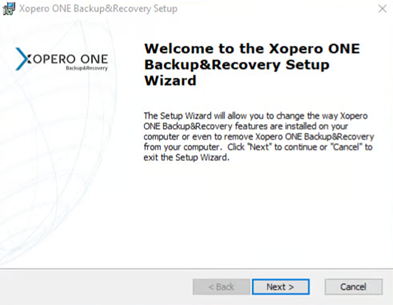
Run the **Xopero ONE Management Service** installer (**XoperoServer.msi**), then select **Next**.
{% endstep %}
{% step %}
Choose **Modify** option and click **Next**.
{% endstep %}
{% step %}
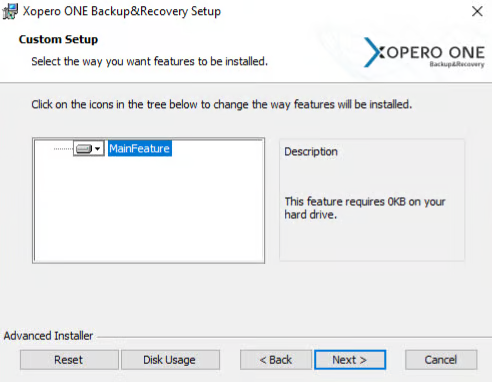
Click **Next** again.
{% endstep %}
{% step %}
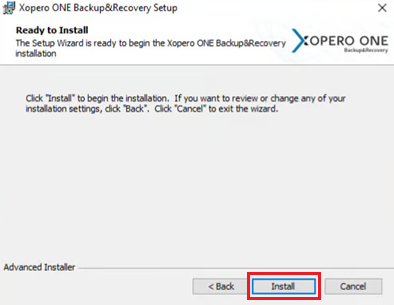
Click **Install** to begin the installation.
{% endstep %}
{% step %}
When the installation is complete, select **Finish**.
{% endstep %}
{% step %}
Go back to the **Task Manager** and start **XoperoONEManagementService** task (right click > **Start**).
{% endstep %}
{% step %}
The **Xopero ONE Management Service** is now updated and ready to work with.
{% endstep %}
{% endstepper %}