Lorem ipsum.
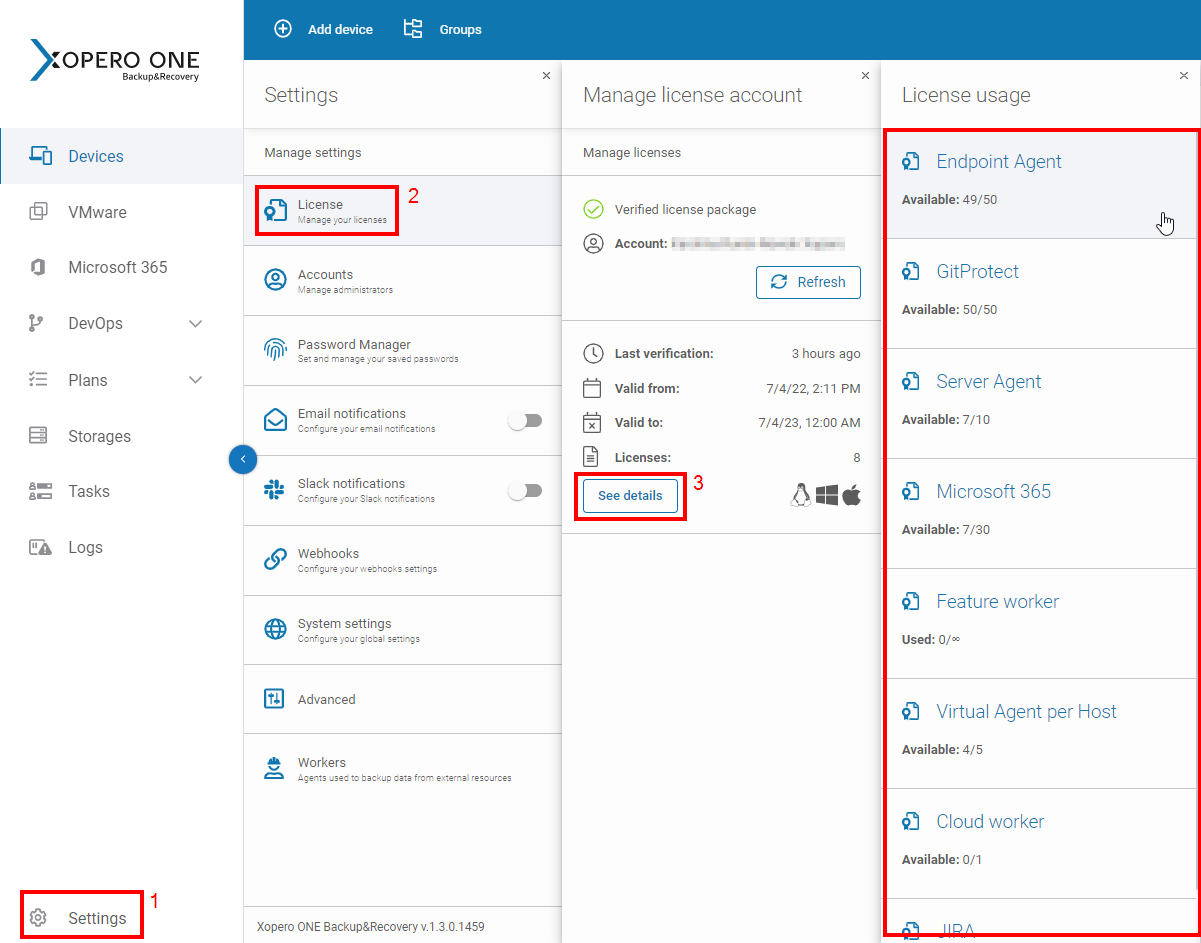
To see all of your available licenses in Xopero ONE Management Service go to Settings > License > See details.
Xopero ONE Management Service (XMS) must periodically synchronize with the licensing server to verify the validity of your subscription and to adjust to any changes, such as added storage capacity or new licenses.
How it works:
Automatic Refresh — by default, XMS automatically refreshes your licenses once every 24 hours.
Offline grace period — to ensure continuity in on-premises environments, Xopero ONE allows the system to continue all backup and restore operations for up to 3 days without a successful license verification.
You can manually trigger a refresh if you have recently modified your license (e.g., upgraded your plan) and want the changes to take effect immediately without waiting for the automatic daily refresh cycle.
To refresh your licenses go to Settings > License and hit the Refresh button under your available license package.
The on-premises deployment model requires your XMS to connect with the Xopero ONE license server once every three days.
This process is performed automatically. If the device with Xopero ONE installed has no internet connectivity, you can configure the specified rules to allow the device to connect to the component listed in the below table.
one.xopero.com
443 (HTTPS)
213.222.221.126