Loading...
Loading...
Loading...
Loading...
Loading...
Loading...
Loading...
Loading...
Loading...
Loading...
Loading...
Loading...
Loading...
Loading...
Loading...
Loading...
Loading...
Loading...
Loading...
Loading...
Loading...
This article provides general information about data protection planning.
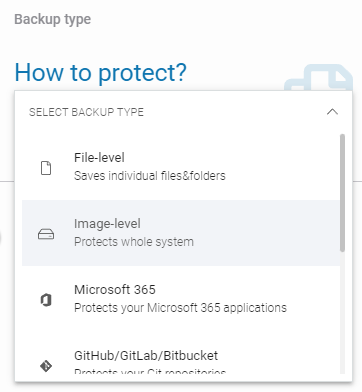
To protect your workstations and servers, you can use one of three main types of backups:
File-level — saves individual files and directories.
Image-level — protects the entire physical disk.
Databases — backs up your databases.
Restore data using bare-metal recovery (BMR), iSCSI target mounting, or file image exports.
This article describes how to prepare a Linux operating system for backing up an Oracle database environment.
Using the Linux command line, log in to the account used for backing up your Oracle database and execute the following commands:
If these tools are unavailable (example below) you need to configure the environment variables.
This article describes how to change the temporary folder used for database backup dumps.
When creating a backup plan, in the Data to protect section, select the folder where database dumps will be stored. You can choose either Select from device or Select path or variable — switch between these options by clicking on the text in the list.
Create a new temporary folder.
Go to the Plans tab and edit the plan you want to change or create a new one.
Perform targeted granular recovery to restore individual files and folders without conducting a full system rollback.
Restore the entire system from an image-level backup copy.

In the Data to protect section, uncheck the old folder and select the new one (if you're creating a new plan, simply select the newly created temporary folder from the list).
Next, go to Advanced settings, then Backup scripts, and update the script arguments to the new database dump location.
Save the changes.

Similarly to backup types, Xopero ONE offers three methods to restore your data:
File-level backup — allows you to restore files directly from your storage. It can also be used to restore databases protected with file-level backup.
Image-level backup — enables restoring an entire disk, individual files from the backup, or the disk as an image file. You can also use BMR (bare-metal recovery) technology to recover data, allowing restoration between physical devices.
Database recovery — includes methods for restoring previously backed-up databases.
Test the Xopero ONE system to determine when backups are performed and choose the best backup schedule. For example, you can schedule backups to run after working hours and enable automatic device shutdown after the backup in the plan settings.
The backup process typically uses the VSS service and device resources. To reduce resource usage, you don’t need to create multiple backup plans for different storages — instead, you can create a replication plan to copy data to another storage.
Edit the /home//.bash_profile file and add the following records:
Now, after logging in again, executing the following commands should complete successfully.
Once done, your Linux system should now be ready to backup an Oracle environment.
echo 'connect target /; quit' | rmanecho 'SELECT INSTANCE_NAME FROM V$INSTANCE;' | sqlplus / as sysdba
export ORACLE_SID=<database_ID>export ORACLE_HOME=database_directoryexport PATH=$ORACLE_HOME/bin:$PATHecho 'connect target /; quit' | rmanecho 'SELECT INSTANCE_NAME FROM V$INSTANCE;' | sqlplus / as sysdbaThis article describes how to change the Oracle database mode.
Before starting the Oracle database backup task, make sure that the database mode is set to ARCHIVELOG. To verify that the mode is configured correctly or to change it, open the command line as the user configured in the backup plan and run the sqlplus tool using the following command:
sqlplus / as sysdbaYou can then close this tool using the QUIT; command.
To verify that the database mode is correctly set to ARCHIVELOG, run the following command:
SELECT LOG_MODE FROM v$database;If the database mode is set to NOARCHIVELOG, change it to ARCHIVELOG.
You can switch the database mode from NOARCHIVELOG to ARCHIVELOG using the following commands:
Now, verify that the database mode has been changed successfully by running the following command:
This article explains how to restore an Oracle database from a backup.
The first step in restoring an Oracle database from backup is to restore the database files from storage to a temporary directory. These files will then be imported into the Oracle database environment.
To restore files backed up using a file-level backup plan follow this guide.
If the database files are restored to a temporary directory, run the following command in the CLI:
/opt/XoperoONEBackupAgent/Xopero.Device.App --oracle-restore database_ID backupuser /home/backupuser/oracle/oracle_database_dump/opt/XoperoONEBackupAgent/Xopero.Device.App — path to the Xopero ONE application
--oracle-restore — parameter used to restore the Oracle database
database_ID — ID of the database to be restored
backupuser — user with permission to restore the database
/home/backupuser/oracle/oracle_database_dump — path to the directory containing the restored database files
If the restore completes successfully, information about the restored database will be displayed on the screen:
If part of the database is currently unavailable (for example, if a user deleted a table), the restoration process described above may fail, as the deletion is a more recent operation in the database.
The solution is to run the modified command:
The last optional parameter, required only when restoring to the source host, should be set to true. This ensures Xopero sets the SCN (System Change Number) to the point immediately after the backup.
Setting this parameter resolves issues with unrestored parts of the database. The restoration method described in the first section of this article will still work, but it may not always produce the expected results.
This article explains how to restore a Microsoft SQL database from a backup.
The first step in restoring a Microsoft SQL database from backup is to restore the database files from storage to a temporary directory. These files will then be imported into the Microsoft SQL database environment.
To restore files backed up using a file-level backup plan follow this guide. If your database was backed up using an image-level backup, use granular recovery to restore it as described in this article.
Once the database files are restored, the next step is to import them into the Microsoft SQL environment.
Open the Microsoft SQL Management Studio.
Log in to the directory tree, right-click Databases, and select the Restore Database option.
In the opened window, select Device as the backup source and provide the path to the folder containing the *.bak database dump file.
After selecting the *.bak file, click OK.
The database has been successfully restored and is now listed in the directory tree.
This article explains how to restore a MySQL database from a backup.
The first step in restoring a MySQL database from backup is to restore the database files from storage to a temporary directory. These files will then be imported into the MySQL database environment.
To restore files backed up using a file-level backup plan follow this guide. If your database was backed up using an image-level backup, use granular recovery to restore it as described in this article.
Once the database files are restored, the next step is to import them into the MySQL environment. To restore the database to the MySQL server, use a database management tool.
To restore the database, log in to the database server using the following command:
mysql -h SERVER_ADDRESS -u USER -pSERVER_ADDRESS — the address of the MySQL server where the database will be restored
USER — the username of the database user
Next, type:
DATABASE_NAME — the name of the database where the dump file will be restored
‼️ If the corrupted database still exists in MySQL, first drop it and recreate the database using the following command:
DATABASE_NAME
The database backup is restored using the SOURCE PATH_TO_FILE command, replacing PATH_TO_FILE with the full path to the previously restored database file. The syntax is as follows:
This article provides information about file-level backup in Xopero ONE.
Log in to Xopero ONE Management Service, go to the Backup tab (Plans > Backup) and click the + Add plan button in the top toolbar.
Select Devices from the platforms list.
This article explains how to restore a PostgreSQL database from a backup.
The first step in restoring a PostgreSQL database from backup is to restore the database files from storage to a temporary directory. These files will then be imported into the PostgreSQL database environment.
To restore files backed up using a file-level backup plan follow . If your database was backed up using an image-level backup, use granular recovery to restore it as described in .
Once the database files are restored, the next step is to import them into the PostgreSQL environment.
Log in to your database server using SSH.


Enter the following command:
The database has been successfully restored

psql dbname < dumpfile.sql/opt/XoperoONEBackupAgent/Xopero.Device.App --oracle-restore database_ID backupuser /home/backupuser/oracle/oracle_database_dump trueAfter creating the new database, use the USE DATABASE_NAME command as described above.
USE DATABASE_NAMECREATE DATABASE DATABASE_NAMESOURCE PATH_TO_FILEIn the next aside, select Files & folders option and choose one or more devices for the plan to apply to (you can also select the plan to include all activated devices).
Define the name of the backup plan.
In the Data to protect section, select the data you want to include in the backup plan:
Global rules allow you to define locations that will apply to all selected devices. This method offers three options to choose from:
Path — allows you to manually enter the file or folder path.
System variable — enables the use of OS variables such as USERPROFILE, ALLUSERSPROFILE, or SystemRoot.
‼️When specifying a variable in Xopero ONE, percent signs % must be omitted.
Xopero variable — provides a predefined list of variables such as SYSTEM_DISK, ALL_DISKS, and HOMES.
Select from device — this method allows you to choose paths individually for each device by connecting remotely to its file system.
When creating a backup plan, you can use filters to gain better control over the files being backed up.
Specify the backup location by choosing from the available storage options within your service.
Configure the Scheduler & data retention settings by defining when backups should run and which types of backup copies to use.
Go to the Advanced settings section to customize additional options, including encryption, compression levels, and bandwidth limit. These settings provide greater flexibility and help optimize the backup process.
After completing the configuration, click the Save button. The protection plan will then automatically begin protecting your devices according to the schedule you defined.

SHUTDOWN IMMEDIATE;
STARTUP MOUNT;
ALTER DATABASE ARCHIVELOG;
ALTER DATABASE OPEN;
QUIT;SELECT LOG_MODE FROM v$database;

In this article you will learn how to configure image-level backup using Xopero ONE Management Service.
Drive image-level backup (aka disk image backup) by definition creates a complete, byte-for-byte copy of a hard drive, including the operating system, all installed applications, settings, and other data. In case of failure, drive image-level backup allows for a rapid and full restoration of the system to its previous state, either on the original or a new device.
Log in to Xopero ONE Management Service, go to the Backup tab (Plans > Backup) and click the + Add plan button in the top toolbar.
Select Devices from the platforms list.
In the next aside, select Whole OS option and choose one or more devices for the plan to apply to (you can also select the plan to include all activated devices, or select device groups for the plan to cover).
Define the name of the backup plan.
In the Data to protect section, select the data you want to include in the backup plan:
Global rules allow you to define locations that will apply to all selected devices. This method offers the Xopero variable option, which provides a predefined list of variables such as SYSTEM_DISK, ALL_DISKS, and HOMES.
Specify the backup location by choosing from the available storage options within your service.
Configure the by defining when backups should run and which types of backup copies to use.
Go to the Advanced settings section to customize additional options, including encryption, compression levels, and bandwidth limit. These settings provide greater flexibility and help optimize the backup process.
After completing the configuration, click the Save button. The protection plan will then automatically begin protecting your devices according to the schedule you defined.
This article describes how to configure the Oracle database environment in Xopero ONE.
The Oracle database backup process in Xopero ONE consists of two stages:
Creating a database dump using backup scripts.
Backing up the created dump file.
The first stage is executed through Xopero ONE using the feature, while the second stage is performed as a standard file-level backup.
This article explains how to configure the PostgreSQL database environment in Xopero ONE.
To maintain data consistency, Xopero recommends using a dedicated backup type: a file-based backup with a pre-backup script for the PostgreSQL database.
Database backup begins with a script that requests the database server to create a dump in a temporary directory. Once the dump is complete, Xopero ONE backs up the generated dump file.
Xopero ONE uses the pg_dump utility to back up PostgreSQL databases.
In this article, you will learn how to restore data from a file-level backup.
Open the restore view in Xopero ONE Management Service using one of the following options:
Go to the Devices tab and click Restore next to the device whose data you want to recover. After selecting the device you want to restore, choose the plan containing the data you want to recover from the Backup plans drop-down menu.


Select from device — this method allows you to select disks individually for each device by connecting remotely to its file system.


The Oracle database environment must operate in ARCHIVELOG mode. For instructions on how to change the database mode, refer to this article.
Log in to XMS, go to the Backup tab (Plans > Backup) and click the + Add plan button in the top toolbar.
Select Devices from the platforms list.
In the next aside, select Files & folders option and choose one or more devices for the plan to apply to (you can also select the plan to include all activated devices).
Define the name of the backup plan.
Configure your backup plan according to your needs (more information about the backup plan setup can be found in ).
Go to the Advanced settings section and click Edit to customize additional options.
Scroll down to the Backup scripts section and click the Pre-task script toggle to turn it on.
Select the script dedicated to backing up the Oracle database environment.
Set up the script arguments — it should be entered in the Script arguments field as follows:
ORACLE_SID — the database identifier.
dbuser — the name of the user with backup privileges (for example, database_user). This must be a local Linux
You can enable the two additional options using the checkboxes:
Wait for the script to continue the task — the application will wait until the dump is ready.
Fail the task if the script fails — if the script fails, the system will notify you of the backup error.
Double-check your settings and click Save to close the Advanced settings aside.
After completing the configuration, click the Save button. The protection plan will then automatically begin protecting your devices and databases according to the schedule you defined.
Add a new user (for example, dbuser) to the Linux operating system by executing the following command:
Add the user to the dba group, which has permission to perform backups:
Finally, configure the system environment variables by following the instructions in this article.
sudo useradd dbusersudo usermod -a -G dba dbuserSelect Devices from the platforms list.
In the next aside, select one of the available options and choose one or more devices for the plan to apply to (you can also select the plan to include all activated devices).
Define the name of the backup plan.
Configure your backup plan according to your needs (more information about the backup plan setup can be found in File-level backup and Image-level backup articles).
Go to the Advanced settings section and click Edit to customize additional options.
Scroll down to the Backup scripts section and click the Pre-task script toggle to turn it on.
Select the script dedicated to backing up the PostgreSQL database environment.
Type your database username into the Database user field.
Choose the user password by opening the Password Manager, where you can either add a new password or select an existing one.
Set up the script arguments — it should be entered in the Script arguments field as follows:
database output_dir "pg_dump_dir" port_numberdatabase — the name of the database to back up. A backup plan can target a single database or all databases. To back up all databases, use the --all parameter instead of specifying a database name.
output_dir — the directory where the database dump will be created; this is also the folder that Xopero ONE will back up.
pg_dump_dir — the path to the pg_dump utility. This is required only for PostgreSQL databases hosted on Windows.
port_number — required only if your PostgreSQL server uses a non-standard port (other than 5432).
You can enable the two additional options using the checkboxes:
Wait for the script to continue the task — the application will wait until the dump is ready.
Fail the task if the script fails — if the script fails, the system will notify you of the backup error.
Double-check your settings and click Save to close the Advanced settings aside.
After completing the configuration, click the Save button. The protection plan will then automatically begin protecting your devices and databases according to the schedule you defined.
Go to the Storages tab, select the storage containing the backup data, and click the folder 📂icon to browse the storage.
Select the device whose data you want to restore. Then, choose the backup plan and review the information about the agent used to connect to the storage.
After selecting the appropriate device and backup plan, the system will display the Backup copies section — here, you can choose the backup version you want to restore. Click the desired date, then select Restore.
The Select data to restore section displays a tree structure of directories and files. You can select specific directories or individual files to restore by marking the checkboxes next to them. To restore the selected data, click Restore selected. If you want to restore all items included in the backup plan, click Restore all.
In the Data to restore section, you can modify the previously selected data that will be included in the restore process. To change or add data, click the Edit button.
The Restore to section allows you to define the destination for the restore process—here, you can select any device that is assigned to the Xopero ONE platform as the target location for your restored data.
In Restore directory section you can specify the exact location where the data will be restored. You can choose to restore it to the original directory or select a new directory.
In Restore settings section, you will find three additional options that can be enabled for the restoration process:
Overwrite existing data — determines whether existing files in the restore directory should be replaced with the restored ones.
Restore files permissions — restores the original file permissions.
Reduce bandwidth — limits network usage during the restore process.
Double-check your configuration and click the Start now button to begin the recovery process.

This article explains how to configure the Microsoft SQL database environment using Xopero ONE.
The Microsoft SQL database backup process in Xopero ONE consists of two steps:
Creating a database dump using backup scripts.
Backing up the database dump.
The first step is performed through Xopero ONE using the backup scripts feature. The second step is a standard file-level or image-level backup executed directly by Xopero ONE.
Log in to XMS, go to the Backup tab (Plans > Backup) and click the + Add plan button in the top toolbar.
Select Devices from the platforms list.
Perform targeted granular recovery to restore individual files and folders without conducting a full system rollback.
Granular recovery enables the restoration of individual files and folders directly from image-level backups. By mounting the disk image through an iSCSI target or as a raw file image, administrators can extract selected data without running a full system restore.
The iSCSI target recovery option allows you to quickly create and share an iSCSI resource over TCP/IP. You can connect this resource to any device without restoring the backup copy to another location. This method facilitates granular recovery, enabling you to easily copy individual files.
The following steps describe how to restore data via an iSCSI target in the Xopero ONE Management Service console.
Open the Devices tab, locate the device from which you want to restore the backup, and click the Restore
Restore the entire system from an image-level backup copy.
Bare-metal recovery (BMR) restores the entire environment from an image-level backup, including the operating system, applications, and all associated data.
BMR (bare-metal restore, also known as bare-metal recovery) enables rapid system recovery using a system image created with disk-imaging software. The image file restores the entire operating system and its underlying configurations in minutes, completely bypassing the lengthy process of manual OS and application re-installation. Because BMR allows you to quickly return a physical machine or server to its full operational state following a data-loss event or hardware failure, it serves as a cornerstone of an effective disaster recovery strategy.
In Xopero ONE, the BMR process is streamlined into four primary steps:
Create an ISO file that includes the pre-configured Xopero ONE backup agent.
This article explains how to use backup scripts to create a MySQL database dump and include it in a backup plan.
The MySQL database backup process in Xopero ONE consists of two steps:
Creating a database dump using backup scripts.
Backing up the database dump.
The first step is performed through Xopero ONE using the backup scripts feature. The second step is a standard file-level or image-level backup executed directly by Xopero ONE


temp_directory — the directory where the Oracle tool will temporarily write backup files. After the backup tasks are complete, these files will be deleted. This directory must also be included in the Data to protect section when creating a file-level backup plan.


ORACLE_SID;dbuser;temp_directoryIn the next aside, select one of the available options and choose one or more devices for the plan to apply to (you can also select the plan to include all activated devices).
Define the name of the backup plan.
Configure your backup plan according to your needs (more information about the backup plan setup can be found in File-level backup and Image-level backup articles).
Go to the Advanced settings section and click Edit to customize additional options.
Scroll down to the Backup scripts section and click the Pre-task script toggle to turn it on.
Select the script dedicated to backing up the Microsoft SQL database environment (Windows).
Type your database username into the Database user field.
Choose the user password by opening the Password Manager, where you can either add a new password or select an existing one.
Set up the script arguments — it should be entered in the Script arguments field as follows:
copy_type server_name "output_dir" database1 database2 ... databaseNcopy_type — defines the type of copy to be performed. You can choose one of three options: full_only, full_diff, or copy_only:
full_only — always performs a full copy.
full_diff — performs differential copies with periodic full copies.
copy_only — creates a full database copy without affecting the regular backup cycle.
server_name — the name of the Microsoft SQL server along with its instance.
output_dir — the directory where database dumps will be saved. This directory must also be selected as the location to back up.
database1 database2 (...) — names of databases to be backed up, separated by spaces. You can leave this parameter empty — if no database is specified,
You can enable the two additional options using the checkboxes:
Wait for the script to continue the task — the application will wait until the dump is ready.
Fail the task if the script fails — if the script fails, the system will notify you of the backup error.
Double-check your settings and click Save to close the Advanced settings aside.
After completing the configuration, click the Save button. The protection plan will then automatically begin protecting your devices and databases according to the schedule you defined.
That’s all you need to do to create the database dump — this file should now be included in the Data to protect section if you are performing a file-level backup (to back up only the database). Alternatively, you can run an image-level backup to protect the entire drive.
Select the backup plan from which you want to restore the data.
Choose the timestamp from which you want to restore the data, click Restore, and select the iSCSI target recovery option from the drop-down menu.
Select the disk you want to restore and click Restore selected, or select all disks by clicking Restore all.
In the iSCSI settings section, select the target network interface and specify the port. You can accept the default values or enter custom parameters.
Accept the default iSCSI target name or enter a custom name.
Select the default worker, which will host the iSCSI target.
Verify that all entered settings are correct, then click the Run iSCSI button to start the iSCSI service.
Once the iSCSI service is running, connect to the iSCSI target to access and restore the selected data.
The following steps describe how to connect to an iSCSI target and initialize the disk in Windows.
Press Windows key + R to open the Run dialog box, type iscsicpl.exe, and click OK or press Enter to launch the iSCSI Initiator.
In the Targets tab, enter the IP address of the network interface from your Xopero ONE iSCSI configuration into the Target field, then click Quick Connect.
The iSCSI Initiator automatically searches for available iSCSI targets and adds them to the Discovered targets list. Click Done to close the dialog box.
If the setup is successful, the target status will change to Connected.
Press Windows key + R to open the Run dialog box, type compmgmt.msc, and click OK or press Enter to launch the Computer Management tool. In the left pane, select Disk Management.
Locate the new disk on the list, right-click it, and select Initialize Disk.
Once initialized, the disk status changes to Online in Disk Management. You can now open File Explorer to browse and copy your selected files and folders to the destination storage.
After the data copy is complete, disconnect the target, open the Tasks tab in Xopero ONE Management Service, click the info icon next to the active iSCSI task, and click Stop iSCSI in the bottom-right corner of the task details pane.
The following steps describe how to connect to an iSCSI target and mount the disk in Linux.
Install the iSCSI initiator package using the following commands:
sudo apt update
sudo apt install open-iscsiThe second command installs open-iscsi and creates the initiator name configuration file at /etc/iscsi/initiatorname.iscsi. Verify or modify this file if your target requires a specific IQN (iSCSI Qualified Name).
cat /etc/iscsi/initiatorname.iscsiNext, start and enable the service.
Once the iSCSI service is running, discover available iSCSI targets by running the following command (use the IP address of the network interface from your Xopero ONE iSCSI configuration):
Running this command returns a list of available target IQNs, for example:
Optionally, configure CHAP authentication — if the target requires authentication, configure your credentials before connecting.
Next, log in to the target.
Verify that the new disk appears.
Format and mount the disk using the following commands:
Once the disk is mounted, you can browse and copy your selected files and folders to the destination storage.
After the data copy is complete, disconnect the target, open the Tasks tab in Xopero ONE Management Service, click the info icon next to the active iSCSI task, and click Stop iSCSI in the bottom-right corner of the task details pane.
The following steps describe how to restore disk backup data via file image in the Xopero ONE Management Service console.
Open the Devices tab, locate the device from which you want to restore the backup, and click the Restore button.
Select the backup plan from which you want to restore the data.
Choose the timestamp from which you want to restore the data, click Restore, and select the file image recovery option from the drop-down menu.
Select the disk you want to restore and click Restore selected.
Next, select the image format from the available options: RAW, VHD, VHDX, or VMDK.
Select the device where you want to restore data. To change it, click the Edit button next to the Restore to section.
In the Restore directory section, specify the exact path to restore data.
In the Restore settings section, configure the following options:
Overwrite existing data: overwrites existing files in the target restore directory.
Reduce bandwidth to: limits network bandwidth consumption during the restoration process.
Double-check your configuration and click the Restore button to start the recovery process.
Write the ISO file to a USB flash drive—or any alternative bootable media—to create a recovery drive.
Boot the target device (the device onto which the system image will be restored) using the newly created media.
Log in to the Xopero ONE Management Service (XMS) and start the recovery process.
The following steps outline the process of creating an ISO image with a pre-configured backup agent using the SVS Creator utility.
Download the SVS Creator utility from the official Xopero website and extract the contents of the ZIP archive to a separate folder.
Run SVSCreator.exe to open the creation wizard.
In the SVS Creator wizard window, specify the temporary working directory path, which also serves as the output destination where the final ISO image will be created. By default, this path is set to C:\Windows\Temp, but you can modify it to a different directory if needed. Once the path is selected, click Next.
Select the appropriate OS architecture (32-bit or 64-bit), then click Next.
The wizard will then automatically download and install the required components.
Once all required components are successfully installed, you have the option to include specific drivers required for the target system's recovery. Click Add to browse and select the necessary drivers, then click Next to proceed.
The wizard will then start generating the final Windows PE-based ISO image.
Once the ISO image is successfully created, an "ISO image with Windows PE successfully built" confirmation message will appear, displaying the exact output directory path of the file. You can then safely close the SVS Creator utility.
Next, write the ISO image to a USB flash drive—or another bootable media—to create a recovery drive. Use it to boot the target device and initiate the image-level backup restore.
The following steps outline the process of booting the Xopero ONE recovery environment on the target device.
Boot the target device using the previously prepared recovery drive.
After the device boots, the SVS application will launch automatically, displaying the following menu options:
Xopero: opens the Xopero window with additional recovery options.
Shell: opens the command-line interface, which can be used for manual network interface configuration.
Reboot: restarts the device.
Shutdown: shuts down the device.
Select Xopero to continue.
A new menu screen will appear with the following options:
Device app: launches the Xopero ONE backup agent application on the device.
Fix boot problems: resolves the operating system boot issues; can be used to fix errors related to the SVS application.
Select Device app to continue.
Enter the service address and the device name to use in Xopero ONE Management Service, then click Connect.
On another device, open the Xopero ONE Management Service panel and start the recovery procedure.
The following steps describe the restore process in Xopero ONE Management Service.
Click the laptop icon in the top-right corner of the management service panel.
Find the target device, select it, and click Activate to assign a license to it.
Open the Devices tab, locate the device from which you want to restore the backup, and click the Restore button.
Select the backup plan from which you want to restore the data.
Choose the timestamp from which you want to restore the data, click Restore, and select the BMR recovery option from the drop-down menu.
Next, select the disk you want to restore and click Restore selected.
Verify that the correct target device is selected in the Restore to field. To change it, click Edit and select the appropriate device. Then, in the Restore directory section, specify the disk to which the backup should be restored.
Optionally, in the Restore settings section, select the checkbox to reset the system drivers, or leave it unchecked to keep the original driver configuration.
Verify that all entered settings are correct, then click the Restore button in the bottom-right corner of the Restore data pane to begin the recovery process.
By using the mysqldump tool, Xopero ONE supports all MySQL versions that are officially supported by Oracle.
Log in to XMS, go to the Backup tab (Plans > Backup) and click the + Add plan button in the top toolbar.
Select Devices from the platforms list.
In the next aside, select one of the available options and choose one or more devices for the plan to apply to (you can also select the plan to include all activated devices).
Define the name of the backup plan.
Configure your backup plan according to your needs (more information about the backup plan setup can be found in and articles).
Go to the Advanced settings section and click Edit to customize additional options.
Scroll down to the Backup scripts section and click the Pre-task script toggle to turn it on.
Select one of the scripts dedicated to backing up the MySQL database environment (Windows or Linux).
Type your database username into the Database user field.
Choose the user password by opening the Password Manager, where you can either add a new password or select an existing one.
Set up the script arguments — it should be entered in the Script arguments field as follows:
database — the name of the database. To include multiple databases in one backup plan, enter their names in the following format: [database1 database2 database3]. To back up all databases, use the --all parameter instead of specifying a database name.
Enable the two additional options using the checkboxes:
Wait for the script to continue the task — the application will wait until the dump is ready.
Fail the task if the script fails — if the script fails, the system will notify you of the backup error.
Double-check your settings and click Save to close the Advanced settings aside.
After completing the configuration, click the Save button. The protection plan will then automatically begin protecting your devices and databases according to the schedule you defined.
That’s all you need to do to create the database dump — this file should now be included in the Data to protect section if you are performing a file-level backup (to back up only the database). Alternatively, you can run an image-level backup to protect the entire drive.



full_diff WINSRV-2019\SQLEXPRESS "C:\MsSQLDumps" database1 database2Reset drivers: resets system drivers to defaults to ensure hardware compatibility during system restoration.
sudo systemctl enable --now iscsid
sudo systemctl status iscsidsudo iscsiadm -m discovery -t sendtargets -p <TARGET_IP>:3260192.168.1.50:3260,1 iqn.2023-01.com.example:storage.disk1sudo iscsiadm -m node -T <TARGET_IQN> -p <TARGET_IP>:3260 \
--op=update -n node.session.auth.authmethod -v CHAP
sudo iscsiadm -m node -T <TARGET_IQN> -p <TARGET_IP>:3260 \
--op=update -n node.session.auth.username -v <CHAP_USER>
sudo iscsiadm -m node -T <TARGET_IQN> -p <TARGET_IP>:3260 \
--op=update -n node.session.auth.password -v <CHAP_PASSWORD>sudo iscsiadm -m node -T <TARGET_IQN> -p <TARGET_IP>:3260 --loginlsblk
sudo dmesg | tail -20sudo mkfs.ext4 /dev/sdb
sudo mkdir -p /mnt/iscsi_disk
sudo mount /dev/sdb /mnt/iscsi_disk


Drivers: allows you to load or add new drivers.


output_dir — the directory where the database dump will be saved. This directory must also be selected in the Data to protect section when creating a backup plan.mysqldump_dir — the path to the mysqldump utility.
port — an optional parameter. Enter the port number only if a non-standard port is used. The default port is 3306.
For example, to back up all databases from the MySQL environment, use the following arguments:
If you want to back up only selected databases from the MySQL environment (for example, two out of seven), use the following arguments:
database output_dir mysqldump_dir portdatabase output_dir port


--all C:\MySQLBackup\ "C:\Program Files\MySQL\MySQL Server 8.0\bin"database1 database2 C:\MySQLBackup\ "C:\Program Files\MySQL\MySQL Server 8.0\bin"


